Podcast

Self-service purchasing in Microsoft 365

In this “ripped from the Message Center” podcast episode, Mike Maadarani, Antonio Maio, and I dive into the recent announcement that Microsoft 365 Copilot will be available for self-subscription purchase.

Self-service purchasing enables employees with Microsoft tenant access to purchase licenses without admin approval. While this may seem like an efficient and agile approach to enabling business innovation, using personal credit cards to purchase licenses for work use presents legal and accounting difficulties. What happens if the employee doesn’t submit ongoing expense reports for the licenses they’re using? What if the employee doesn’t realize what they’ve purchased and has ongoing credit card expenses? What happens to the self-service licenses when the employee leaves the organization?

Episode highlights:

  • History of self-service purchasing capabilities
  • How self-service purchasing works and why it presents difficulties for so many organizations
  • Demo of how to disable self-service purchasing for each Microsoft product

How to engage with the Microsoft community

How to engage with the Microsoft community (M365 Voice version)

Everything has changed in the last two years. Social platforms we used as a mainstay only a couple of years ago are now obsolete. Episode 127 of the M365 Voice podcast explores how Mike, Antonio, and I connect with the Microsoft community, share podcast updates, and engage with others.

  • Reimagining the way we write blog posts, moving from 1-5 page blog posts to microblogging
  • Shifting away from using X (the app formerly known as Twitter)
  • Using LinkedIn as a primary messaging platform

Great discussion, Mike and Antonio!

SharePoint Agents podcast promo image

SharePoint Agents with M365 Voice & Vlad Catrinescu

Delighted to have Vlad Catrinescu join us on Episode 126 of the M365 Voice podcast! Listen in as we take a deep dive into SharePoint Agents:

  • Create a Microsoft Copilot AI agent focused on a specific SharePoint site, document library, or document
  • Give the agent instructions (e.g., hardcode instructions on what role the agent should play, what languages it should reply in, how it should format responses, etc.)
  • Create multiple agents per SharePoint site
  • Understand who can create and publish SharePoint agents on sites

Great discussion, Mike, Antonio, and Vlad!

A new podcast series on Microsoft Copilot

Mike Maadarani, Antonio Maio, and I have launched a new M365 Voice podcast series on Microsoft Copilot! The series includes tips on ethical use, governance, and adoption of Copilot, as well as product overviews and key features. We’re also bringing an array of Microsoft and MVP community guests to share their knowledge and tips on how they use Copilot every day. To date we’ve launched four episodes in the series:

Microsoft 365 PnP Weekly podcast

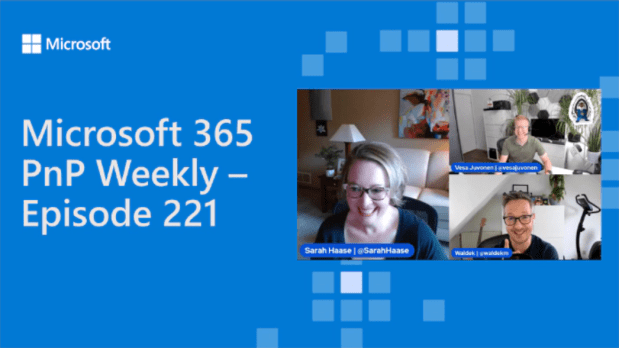
I was thrilled to join Microsoft 365 PnP Weekly hosts Vesa Juvonen (Microsoft) and Waldek Mastykarz (Microsoft) on episode 221 of their podcast! I’ve watched their show for years and been featured in their article highlights before, but this is my first time joining the podcast as a guest. Quite the fan girl moment for me!

During the episode we covered a wide range of topics, including:

  • The eternal debate: folders versus metadata
  • The importance of data classification to support findability
  • How organizational culture influences collaboration and adoption of Microsoft 365
  • Using Innovation Games to gather insights on your users
  • Using Viva Engage as a vehicle to drive traffic to organizational content
  • The difference between compliance and adoption
  • Driving adoption of Microsoft 365 at scale in large organizations
  • What’s coming soon: M365 Twin Cities on Nov 11, 2023

I hope you enjoy the episode!

Celebrating 100 episodes of M365 Voice!

We are SO excited to share Episode 100 of the M365 Voice! It’s been an amazing journey creating 100 episodes. Mike Maadarani and Antonio Maio are amazingly talented and knowledgeable – I’m honored to join them on the podcast and call them friends.

To celebrate 100 episodes, we asked a few friends to join us for a special remembrance episode. Welcome back to the M365 Voice, Karuana Gatimu, Mark Kashman, and Heidi Jordan! We had a great chat during this episode, discussing recent Microsoft announcements (including Microsoft Copilot!) and sharing our favorite podcast memories.

We’ll be coming back with more episodes of M365 Voice very soon. In the meantime, check out these fun facts about how #M365 Voice has grown up!

  • Mike Maadarani & Antonio Maio started the podcast in late 2019. Their first guest was Karuana Gatimu
  • Sarah Haase joined the podcast on episode 11 (Spring 2020)
  • Our most popular episode of all time was Sarah’s first episode – Are metadata, content types, and taxonomy still relevant in SharePoint Online?
  • Our second most popular episode is Talking about Viva Connections
  • We enjoy a healthy debate on the podcast. Almost every episode includes a diverging set of thoughts & opinions, but there’s nothing we disagree on more than email management!
  • We’ve had the good fortune to welcome a wide range of guests on the podcast, including Laurie Pottmeyer, Sebastian Levert, Karuana Gatimu, Mark Kashman, Joanne Klein, Heidi Jordan, Bill Baer, DC Padur, Heather Cook, Thomas Daly, Chris McNulty, Matt Soseman, Mike Fitzmaurice, David Drever, Daniel Glenn, Pete Simpkins, Drew Madelung, Stephen Rose, and Edith Young.

Thank you to everyone that has listened in and made these first 100 episodes so memorable!

A discussion about Microsoft 365 Copilot

In March 2023, Microsoft announced Microsoft 365 Copilot. Copilot will leverage the power of large language models alongside your Microsoft Graph data to reinvent productivity.

Copilot will be integrated into the Microsoft 365 apps we use every day (Outlook, Word, Excel, PowerPoint, Teams, Viva Engage, etc.). You’ll be able to use natural language commands to prompt Copilot (e.g., draft a 2-page proposal in Word based on the contents of this Excel spreadsheet and PowerPoint presentation). You’ll then be able to work with Copilot to refine the text, change its voice, make it more concise, etc.

Microsoft is testing Copilot in a small private preview with 20 customers today. Microsoft says they’ll be expanding the pilot, with more release details to come in the Microsoft Roadmap. Expect Copilot to be a key part of Microsoft’s announcements at upcoming conferences. It’s going to be a huge year!

MVP discussion about Copilot

Mike Maadarani, Antonio Maio, and I discuss Copilot on Episode 95 of the Microsoft 365 Voice. Key topics covered:

  • How AI (Artificial Intelligence) will continue to change the way we work
  • Examples of the productivity enhancements Copilot will bring to Word, Excel, PowerPoint, and Outlook
  • Ways in which we believe Copilot can help us manage our Teams meetings (e.g., summarizing meeting topics discussed, catching users up to speed on topics discussed if they arrive late, etc.)
  • How Copilot can prompt leaders with suggested verbiage for Viva Engage posts
  • A quick overview of the newly announced Microsoft Security Copilot
  • Use of AI “for good” with ethical controls

Links to Microsoft Copilot articles: Introducing Microsoft 365 Copilot—A whole new way to work, Introducing Microsoft 365 Copilot – your copilot for work, Administration of Microsoft 365 in the new era of AI

Have a Microsoft 365 question? Submit it online! Your question may be featured in a future podcast episode.

Introducing Pronouns in Microsoft 365

Microsoft recently announced the ability for people within organizations to share pronouns within their Microsoft 365 profile. This is an exciting change, enabling organizations to create greater opportunities for inclusion.

We highlighted the new capabilities in Episode 93 of the Microsoft 365 Voice:

It’s great to see Microsoft supporting everyone in our community. Pronouns matter. Letting people choose their pronouns and having these pronouns reflected in Microsoft 365 are an important part of respecting everyone’s individuality.

The feature is disabled by default. IT administrators must enable pronouns before users will have the option to provide pronouns in their M365 profile cards. IT administrators should plan for this configuration change to take several hours to fully propagate in their tenant before the pronouns are available for editing.

Employees can choose whether to provide pronouns. Employees aren’t required to add pronouns to their profile cards. Employees that choose to add pronouns will have the pronouns appear on their M365 contact cards.

Microsoft has said more functionality is coming later this year. Stay tuned to the Microsoft 365 roadmap for further news.

Organizations that enable pronouns need to share the news. Consider how you’ll alert your employees that they can now provide their pronouns. Consider using Viva Connections or Viva Engage to spread the news. We provide several ideas during the episode on how to share this news across your organization.

Links to Microsoft articles: Creating the conditions for inclusion: Introducing Pronouns in Microsoft 365, https://aka.ms/M365PronounsUser, https://aka.ms/M365PronounsAdmin

Have a Microsoft 365 question? Submit it online! Your question may be featured in a future podcast episode.

In celebration of Women’s History Month

March is Women’s History Month, a time to reflect on, appreciate, and celebrate the contributions women have made to change and improve our lives. As a female technologist, I’m passionate about encouraging and mentoring our #WomenInTech every day. Our female technology leaders face unique challenges. We’re often outnumbered by our male counterparts and can face an uphill journey to prove ourselves. But we bring strengths to the tech workplace: communication and critical-thinking skills, diverse life perspectives, and distinctive ways of solving traditional technology challenges.

This month we’re thrilled to welcome Edith Young to Episode 92 of the Microsoft 365 Voice. Edith is an IT leader with extensive experience in the Microsoft space. She also serves as a mentor and board member for TeamWomen, an organization dedicated to helping women and girls rise together.

We had a great discussion with Edith on the importance of leadership and mentoring. Key topics discussed include:

  • Be OK being uncomfortable. How to lean into discomfort when you’re starting a new role, stretching to take on a new project, etc.
  • Find your truth-tellers. Build relationships with those that will give you an unvarnished perspective on your performance, your personal brand, etc.
  • Build partnerships. Identify the key individuals, leaders, and teams to invest in building strategic partnerships with.
  • Look for leadership inspiration. Join a mentorship circle, take a leadership class, read books on leadership to gain new perspective and ideas.
  • Lean into new opportunities (especially the scary ones). When an unexpected opportunity to stretch and grow comes your way, lean into it.

A big thank you to Edith for joining us. We hope you enjoy this episode as much as we did!

Have a Microsoft 365 question? Submit it online! Your question may be featured in a future podcast episode.

A conversation with Stephen Rose

We’re thrilled to welcome Stephen Rose to Episode 90 of the Microsoft 365 Voice. Stephen is a Senior Marketing Manager for Teams and is the host of Inside Microsoft Teams (aka.ms/InsideMSTeams).

Topics covered in this episode:

An introduction to Teams Premium. Microsoft is bundling 400+ advanced features and artificial intelligence capabilities into Teams Premium. Organizations can purchase Teams Premium for specific users that need features like live meeting translations, intelligent recap, personalized timeline markers, etc.

The power of AI. Many of the Microsoft products we use every day have artificial intelligence. My personal favorite is subtitles in Microsoft PowerPoint. Turn on subtitles before you go into presentation mode, and you’ll see a live transcription of your meeting/presentation. You can transcribe from and to a myriad of languages – and it’s all powered by AI.

The importance of adoption. As Stephen shares, many of our organizations have gone through a profound transformation in the last 3.5 years. Our work here isn’t done. We need to ensure our information workers know and understand the Microsoft Teams capabilities they have – and how these features can help drive strong business outcomes. We also have to build awareness of when a Teams message is better suited than an email (particularly for different types of workers who respond differently to emails than IMs and texts).

Making Teams easier to use. Microsoft is continuing to invest in simplifying the Teams meeting experience, from streamlined content sharing to advanced features like PowerPoint Live.

A big thank you to Stephen for joining us. We hope you enjoy this episode as much as we did!

Have a Microsoft 365 question? Submit it online! Your question may be featured in a future podcast episode.